


 SHARE:
Lightning flashed across the Osoyoos sky, the smell of ash falling with the rain in a sudden thunderstorm. Red light peeked above the edge of a hill to the west. Was it the sunset filtered through cloud and the haze of smoke, or the start of a new wildfire?
It’s a question that has become uncomfortably familiar for many B.C. travellers and residents. Summer — the province’s peak travel time — has now become fire season, and tourists often travel into some of the most fire-prone areas during the most precarious times of year. Many residents in the Interior, meanwhile, know all too well what it’s like to be able to see wildfire flames from their homes.
This precarity highlights why authorities urge travellers and residents to make sure they have access to local emergency information channels — and why it’s important to do so when fire breaks out and time is of the essence.
The province can use Alert Ready, a national emergency alert system, to send notifications to people’s phones, radios and televisions day or night. The system — which most people will know through the semi-annual test alerts — can be used to give people in a certain area targeted notifications related to wildfires and evacuation orders. But the process requires an extra step, with local governments requesting B.C.’s Ministry of Emergency Management and Climate Readiness to send out an alert on their behalf, and Alert Ready is rarely used for wildfire evacuation notices.
This wildfire season, there have been only three Alert Ready notifications for wildfires: one for the Saw Creek wildfire in June, another for the Brunswick wildfire complex near Boston Bar on July 21 and a third for the Big Bar wildfire complex threatening Clinton on July 24.
The Alert Ready system can’t be used by local governments to share less urgent alerts or more specific information about evacuations. Because of that, most communities have opted to deploy one of three different emergency alert systems.
The lack of a unified alerting system can introduce a degree of confusion — especially for tourists and travellers. But determining which system is used locally and downloading it to your phone — ideally, before a fire or other event happens — is worth the effort in a province where fires, earthquakes, floods and other hazards are all too common.
We’ve listed the three most common applications below, along with links to download them; the websites of local governments usually provide information on which emergency alert system they use. Many, but not all, municipalities use the same alert system as the local regional district.
Alertable
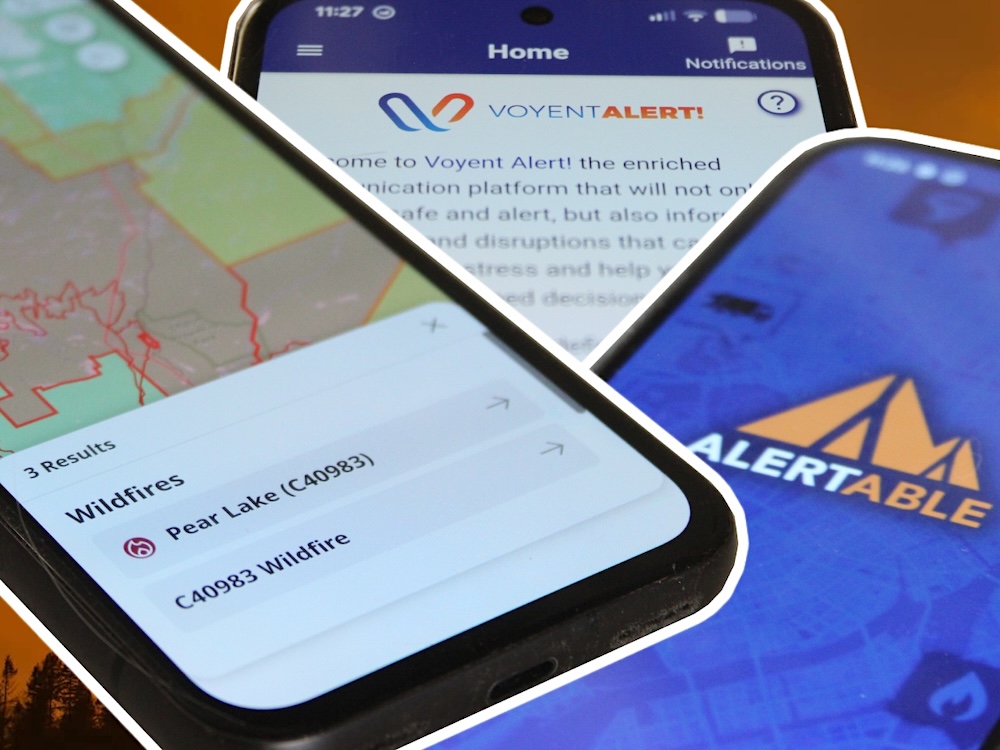
The Alertable app was developed in Alberta in 2013 and has become one of the most used emergency alert systems in the country. It is available for both Apple and Android, as well as Amazon Alexa devices. (There is also a desktop version.)
Alertable is connected to Alert Ready and is probably the most common app used by local governments. However, it’s not always clear when a town is not part of Alertable’s system, which can make it challenging to know if you are fully covered.
Regional districts that use Alertable include Metro Vancouver, the Central Okanagan including Kelowna, the Fraser Valley including Chilliwack, the Columbia Shuswap and the Gulf Islands, among others.
Alertable is particularly useful for travellers. When you sign up for the app, you have to choose at least one location for which you will receive alerts, but the app can also track your location, if you let it, so you can receive alerts for places you are just visiting.
The app will always show critical alerts — the “Leave now, a fire is coming” level of alert — but you can choose to receive advisories, such as air quality or drinking water advisories, as well.
However, if you add a location with an active, but previously sent, evacuation alert, you may not receive information about that alert. The BC Wildfire Service has a list of all active evacuation alerts, so you can check to see if you’ve missed anything.
Voyent Alert!
Many areas that are not covered by Alertable in B.C. use the Voyent Alert! app to share emergency alerts and less urgent local notifications such as garbage and recycling information. Kamloops, Nanaimo, Castlegar, Nelson, Tofino, the Regional District of Okanagan-Similkameen and the Regional District of East Kootenay are among the B.C. communities that use Voyent Alert! to send updates.
When you sign up for the app, you need to choose one location to begin with. (You can add more once you are registered in the app.) The app recommends you have your location be a street address, but you can also choose a whole city instead. You need to manually enter your location in the app; it won’t send alerts based on your location as you travel.
Because Voyent Alert! is geared towards residents, the app will send alerts related to non-emergency events, such as pool closures or garbage disruptions. There is no way to choose to receive only emergency alerts.
As with Alertable, if you add a location with an active, but already sent, evacuation alert, you may not receive information about that alert. Again, the BC Wildfire Service’s app and website are the places to go for that information.
Voyent Alert! is available for both Apple and Android and can also send email, text or voice notifications.
Voyent Alert! is best downloaded if you know for sure that the community you are visiting uses the app to send emergency alerts. You can usually find out that information on the local government website.
Connect Rocket
Some communities, including Comox Valley and Prince George, use another system called Connect Rocket to send emergency information.
Connect Rocket is not actually an app: instead, it sends text, voice or email messages to registered users. Notifications are only about emergencies, such as wildfires and floods. Residents can sign up to receive notifications on an ongoing basis; in some places, tourists can register as a visitor and get notifications sent to their phone for only as long as they are in town.
Unlike with Alertable and Voyent Alert!, users must register for each location individually. You cannot search Connect Rocket’s website to find out which communities use the system; you will need to get that information from the local government’s website.
BC Wildfire Service
The BC Wildfire Service app does not send emergency alerts, but it is helpful to have in wildfire season. The app lets users look at the province’s wildfire map, check on the status of wildfires near them and report new fires directly from inside the app.
The “Response” tab for each fire provides information that sometimes includes new information about the progress of a blaze and fire officials’ expectations for the days to come.
It will not send a notification when a new evacuation order is given, but it can help travellers plan their holidays better and ensure residents stay informed about the threat a blaze poses to their community.
The BC Wildfire Service app is available for Apple and Android devices. ![[Tyee]](/design-article.thetyee.ca/ui/img/yellowblob.png)
Read more: Science + Tech, Environment











Tyee Commenting Guidelines
Please note that email notifications for replies are not currently working due to a software issue which may be resolved in a future update.
Comments that violate guidelines risk being deleted, and violations may result in a temporary or permanent user ban. Maintain the spirit of good conversation to stay in the discussion and be patient with moderators. Comments are reviewed regularly but not in real time.
Do:
Do not: